
|
|
#1
 10-29-2019, 11:13 AM
|
|||
|
 EC in HD textures. demo
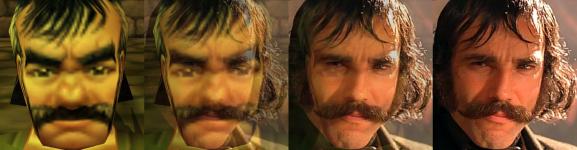
With the release of green, I've decided to maybe pick up where i left off with my my zone/mob/object re texture project. And since there are less zones on green, i won't be so overwhelmed. Also I'm using newer up scaling tech which uses AI to fill in some data.
So I'm a bit rusty at this and needed to re download programs and extract textures and all that bologna. After a bit of trial and error, i was able to retexture ALL of EC, including npcs, objects and environment. The textures were upscaled x 4 using gigabpixel AI. It also helps if you have EQ Classic HD to make global textures look better. To install, just extract the three .s3d files into your everquest directory. I suggest backing up your vanilla textures so you can revert the changes. Download link here for East Commons in HD (4x)
__________________
| ||

|
|||
|
#2
10-29-2019, 02:49 PM
|
||||
|
Quote:
| |||
|
|
||||
|
#3
10-29-2019, 04:16 PM
|
|||
|
i just did highpass for ya, let me know what you think. I just checked it out and looks pretty good. it takes about an hour of processing and converting wish i could do all the zones quicker. ill prolly make a video tutorial so i can get help if there's interest.
here's the download link
__________________
| ||
|
|
|||
|
#5
10-29-2019, 10:11 PM
|
|||
|
Screenshots please.
__________________
Loramin Frostseer <Anonymous>, Hetch<Anonymous>, Tecla <Kingdom>, ... Check out the "Where To Go For XP/For Treasure?" Guides Anyone can improve the wiki! If you are new to the Blue or Green servers, you can improve the wiki to earn a "welcome package" of platinum and/or gear! Send me a forum message for details. | ||
|
|
|||
|
#7
10-29-2019, 11:17 PM
|
|||
|
Totes make a tutorial.
__________________
 [Famalin Wisdomseed - High Elf Wizard - Quellious - 99 to 01] | ||
|
|
|||
|
#8
10-30-2019, 11:03 AM
|
||||
|
Quote:
| |||
|
|
||||
|
#10
10-30-2019, 05:03 PM
|
|||
|
Excellent, would love some more Vanilla zones done this way.
| ||
|
|
|||
 |
|
|








 Linear Mode

